
Likee-Live, Chat & Party Games
Likeme Pte. Ltd.Social
4.4135.91K Reviews
- Version
- 5.63.1
- Installs
- 1.00B
- Age Rating
- Teen
Screenshots
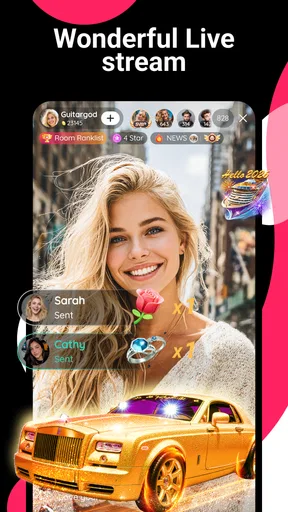
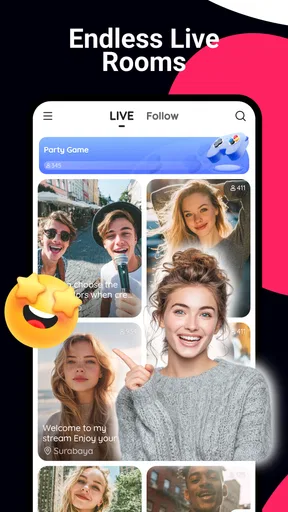
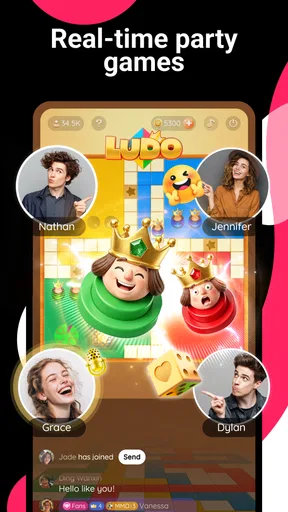
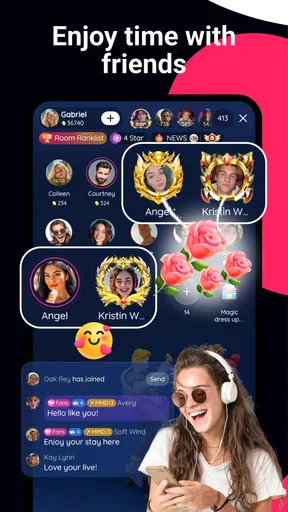
Our Review of Likee-Live, Chat & Party Games
 Analysis by Appyee
I treat short-video apps as pocket entertainment: useful in small gaps, but very good at turning a quick look into a long scroll. Likee - Short Video Community has the same pull, yet it also gives viewers a straightforward way to try making videos themselves. Whether it feels worthwhile depends less on flashy effects than on what you want from a social app—and how reliably you can stay connected while using it.
When a connection makes the difference
Likee is built around watching and sharing short videos, so a working internet connection is central to the experience. Browsing, following creators, taking part in community activity, and sharing a finished clip all depend on reaching the service. When the feed is flowing, it is easy to move from one idea to another; on a weak connection, that same rhythm can feel broken rather than relaxing.
I would think of it as an app for connected breaks, not as something to rely on when I know I will be offline. A sensible routine is to open it when you have a stable connection, decide what you came to do, and close it when you are done. That small boundary matters because a feed has no natural stopping point, and an interrupted session can make it harder to remember why you picked up your phone.
Made for the spare moments in a phone day
The format suits a commute stop, a lunch break, or a quiet moment while waiting for an appointment. A short clip is easy to fit into a pause, while browsing a community or exploring several creators can turn that pause into a much longer session. I find the distinction useful: Likee works best when I choose a brief purpose, such as watching a few videos on a topic or checking a creator I already follow.
It also has a more active side for anyone who likes making things. You can try an effect, add music, and shape a clip without starting with complicated editing software. That is a good fit for casual experimentation, a quick response to a challenge, or sharing a small moment with people who enjoy the same kind of content. If your goal is careful, frame-by-frame editing or a polished long-form production, a dedicated editing app is likely a better tool.
What to do when the flow breaks
A weak or interrupted connection can affect the parts of Likee that rely on loading fresh content or sending activity to other people. In that situation, I would avoid repeatedly tapping through the feed or resubmitting an action. First check whether other online apps are working, then try again once the connection is steady. This is ordinary troubleshooting, but it is especially useful in a video app where a pause can look like a frozen screen.
For creators, it helps to separate making a clip from sharing it. Take a moment to review the result before trying to publish, and wait for the upload process to finish before leaving the app. If a connection drops, check whether the clip appears as shared before attempting the same action again; that simple check can prevent duplicate posts. I would not plan an important, time-sensitive post around an unreliable network.
Keeping mobile use deliberate
Short videos can consume mobile data quickly, particularly when one clip leads straight into another. If you are watching away from Wi-Fi, a practical approach is to keep sessions short and avoid leaving the feed running while your attention is elsewhere. Anyone with a limited data allowance should make connectivity part of the decision about when to browse, rather than treating every spare minute as an invitation to open the app.
Making videos has its own trade-off: effects and music can encourage you to try several versions before you settle on one. That creative trial-and-error is enjoyable, but it can take longer than the finished clip suggests. I would experiment when I have time and a reliable connection, then share only the version I actually want people to see. This also makes the app easier to enjoy without feeling pushed to post every idea.
Discovering Likee: The Basics
If you haven’t heard about Likee yet, let me break it down for you. It’s a short video platform, similar to TikTok, where users can create, upload, and share short videos with a vibrant community. The app is available on both Android and iOS, making it accessible to basically everyone with a smartphone. The moment I opened the app, I was greeted with a colorful, engaging interface that practically begged me to dive in.
Creating Magic with a Tap
One of the coolest features of Likee is its vast array of video editing tools. Even if you’re not a video editing wizard, Likee makes it super easy to add effects, music, and filters to your clips. I found myself playing around with the “Magic” effects, which let you add special effects with just a tap. It’s like having a mini Hollywood studio in your pocket!
Beyond effects, the app also offers a plethora of music options to overlay on your videos. Whether you’re into pop, rock, or something a little more niche, you’re likely to find the perfect track to accompany your masterpiece.
Building a Community
One aspect that sets Likee apart is its community. The app doesn’t just focus on individual video creation; it encourages interaction and collaboration. You can follow creators, join “Groups” to connect with people who share your interests, and even participate in challenges. I joined a few challenges myself and was surprised at how much fun it was to see everyone’s unique takes on the same theme.
Additionally, the app’s recommendation algorithm learns from your interactions and suggests content that matches your interests. I found myself discovering new creators and trends I wouldn’t have stumbled upon otherwise, which definitely kept things fresh and exciting.
Safety and Privacy Features
In today’s digital age, safety is a huge concern, especially on social media platforms. Likee takes this seriously by offering a range of privacy settings. You can control who sees your content and who can interact with you. Plus, the app has a “Family Pairing” feature that allows parents to link their accounts with their kids’ to monitor activity.
I appreciated how easy it was to customize these settings, giving me peace of mind while enjoying the app. It’s always nice to know that a platform prioritizes user safety and privacy.
Getting more from the feed and creator tools
A useful way to explore Likee without letting recommendations take over is to treat your interactions as deliberate signals. If I want more cooking clips, for example, I watch and follow creators in that area rather than lingering on unrelated videos. Recommendations can make discovery feel effortless, but they also reflect what I pause on, so a few casual taps may shift the feed in a direction I did not intend.
Challenges are most rewarding when I use them as prompts rather than obligations. I can borrow the shared theme, make a version that fits my interests, and enjoy seeing how other people interpreted the same idea. The trade-off is that participation puts my creation into a social setting, so I would review the clip and its audience settings before sharing anything personal or location-revealing.
For a first attempt, I would keep the workflow simple: choose one idea, test an effect, add music only if it improves the clip, and watch the result once before posting. This makes it easier to judge which tool actually helped. Effects can be entertaining, but piling on several can distract from the subject; a single clear choice often makes a more watchable video than using every option at once.
Choosing Likee over another short-video app
Compared with familiar short-video alternatives such as TikTok, Likee belongs to the same broad habit of scrolling, following creators, and making compact clips. Its appeal for me is the combination of effect-led creation and community activities such as Groups and challenges. If those features are what you want to explore, it has a clear reason to sit alongside other social apps rather than feeling like only another place to watch a feed.
The better choice depends on where your friends and favorite creators already spend time, and on which app’s style you enjoy. If your main priority is editing precision, use a dedicated video editor and share the result through the social platform that suits your audience. If you want a calmer experience with a definite endpoint, a feed-driven app may not be the right fit at all. Likee is strongest when you enjoy both discovery and participation, not when you want complete control over every part of your viewing.
Who will enjoy it—and who may prefer something else
I can see Likee working well for someone who likes quick entertainment, playful visual effects, and the social side of joining a shared theme. It is also approachable for a new creator who wants to test simple video ideas without first learning a complex editor. A realistic everyday use is recording a lighthearted clip during a break, adding one effect, then checking it over and sharing it when the connection is steady.
I would be more cautious about recommending it to someone who dislikes algorithmic feeds, is trying to reduce screen time, or wants a platform mainly for private conversations. Parents should take time to review privacy controls and talk with younger users about what they share and who can interact with them. Likee is rated Teen, which is a helpful age signal, but it does not replace household expectations or an adult’s judgment about a particular child’s readiness for social media.
Practical questions about cost and device compatibility are straightforward: Likee is free to download, while it offers in-app purchases priced from around eleven cents to $120 per item. The listed Android minimum is version 5.0. Those details make it easier to assess whether it fits your phone and spending preferences, but I would still approach any optional purchase carefully and check what I am choosing before confirming it.
What its scale says—and what it does not
Likee is developed by Likeme Pte. Ltd. and has been available since July 26, 2017. Its current version is 5.53.3, and its average rating is 4.4 from around 11 million ratings, with about 137,000 written reviews. More than 500 million installs show that it has reached a very large audience, though popularity alone cannot tell me whether its style will suit my habits.
That scale can make discovery lively, but it also means the experience is not just a personal editing tool; it is a public-facing social environment. I would think about what I want from the app before investing time in building a profile or posting regularly. Watching casually, creating occasionally, and participating in a community are different levels of commitment, and there is no need to move from one to the next unless it adds something I value.
Safety and Privacy Features
In today’s digital age, safety is a huge concern, especially on social media platforms. Likee takes this seriously by offering a range of privacy settings. You can control who sees your content and who can interact with you. Plus, the app has a “Family Pairing” feature that allows parents to link their accounts with their kids’ to monitor activity.
I appreciated how easy it was to customize these settings, giving me peace of mind while enjoying the app. It’s always nice to know that a platform prioritizes user safety and privacy.
Final Thoughts: Is Likee Worth Your Time?
So, after spending some quality time with Likee - Short Video Community, what’s the verdict? Honestly, it’s a blast. It’s perfect for those moments when you’re waiting for your coffee to brew or need a quick laughter boost during a hectic day. The app’s user-friendly interface, creative tools, and engaging community make it a compelling choice for anyone looking to explore their creative side.
Whether you're a seasoned content creator or just someone who loves to watch entertaining videos, Likee offers something for everyone. So why not give it a shot? You might just find your next favorite pastime.
My connectivity verdict
For me, Likee is worth trying if I have a dependable connection, enjoy short-form video, and want the option to make as well as watch clips. Its effects, music, recommendations, Groups, and challenges give it more to explore than passive scrolling alone. I would use it in intentional sessions, keep mobile data in mind, and check audience settings before posting.
If I needed offline-first entertainment, precise editing, or a feed that naturally ends, I would choose a different tool for that purpose. But for a connected break with room for playful creation and community participation, Likee can be a fun addition—as long as I decide when to put the phone down.
How Likee-Live, Chat & Party Games Compares
Full ComparisonChoose Instagram for a broad social network, TikTok for short-video discovery and effects, or Likee for video creation paired with live chats and party games.
| App | Developer | Rating | Price |
|---|---|---|---|
 Instagram | 4.0 | Free | |
 TikTok - Videos, Shop & LIVE | TikTok Pte. Ltd. | 4.0 | Free |
 Likee-Live, Chat & Party GamesThis App | Likeme Pte. Ltd. | 4.4 | Free |
Verdict
Strengths of Likee-Live, Chat & Party Games
- Extensive library of video effects.
- User-friendly interface for easy navigation.
- Active community with diverse content.
- Regular updates with new features.
- Easy video sharing across platforms.
Limitations of Likee-Live, Chat & Party Games
- Some features require in-app purchases.
- Occasional inappropriate content.
- Ads can interrupt user experience.
- High data consumption for video uploads.
- Privacy concerns with video sharing.
Similar Picks in This Category
View All
Meta Platforms, Inc.4.6

Instagram4.0

Facebook Lite
Meta Platforms, Inc.4.5

TikTok - Videos, Shop & LIVE
TikTok Pte. Ltd.4.0

Moj: Free Short Drama & Reels
ShareChat4.1

Bigo Live - Live Streaming App
Bigo Technology Pte. Ltd.4.5
You May Also Like
View All


Frequently Asked Questions
What features does Likee offer for creating and editing videos?
Likee provides a wide range of creative tools, including filters, stickers, and special effects to enhance your videos. Users can take advantage of music integration, speed control, and a variety of editing tools to create engaging content. Additionally, the app offers live streaming and a community to interact with other creators.
Is Likee safe for children to use?
Likee has implemented safety measures such as parental controls and privacy settings to ensure a safer environment for younger users. However, parents should be aware that like any social platform, supervision is recommended. The app includes options to report inappropriate content and block certain users to enhance safety.
How does Likee's algorithm work to show content?
Likee uses an algorithm that curates content based on user preferences, interactions, and trending topics. The app analyzes likes, shares, and viewing habits to present personalized recommendations. This ensures users receive a tailored experience, with content that aligns with their interests and engagement history.
Are there any costs associated with using Likee?
Likee is free to download and use, with no mandatory fees. However, the app offers in-app purchases for additional features, virtual gifts, and premium content. These purchases are optional, and users can enjoy most of the app's features without spending money.
What privacy concerns should users be aware of on Likee?
Users should be aware that Likee collects data to enhance user experience and ad targeting. The app requires permissions for camera and microphone access. Reviewing privacy settings and adjusting them according to personal preferences is recommended. Users should also be cautious about sharing personal information publicly.
